Hide your fleet, take turns firing, sink the enemy
Offline
Play against bots, no connection needed.
Bot skill
Fire again after a hit
Online play
Match with other players. Start when the table is full.
My matches
Loading…
Live matches
Loading…
How to play
Each side has a 10×10 sea (columns A–J, rows 1–10) and a fleet: a carrier (5 cells), a cruiser (4), a destroyer (3), a submarine (3) and a patrol boat (2).
Ships lie horizontally or vertically. They may not overlap or touch: two ships need at least one empty cell between them, and touching diagonally is not allowed either.
Both sides place their fleets at the same time, and the other side cannot see your layout. Your ships start in a random layout: drag a ship to move it, tap the selected ship to rotate it, or shuffle again. When you are done, tap Ready.
When both sides are ready, a random draw decides who fires first. Then you take turns firing at a cell of the other sea that has not been shot yet. Every shot is reported as a miss, a hit or a sink.
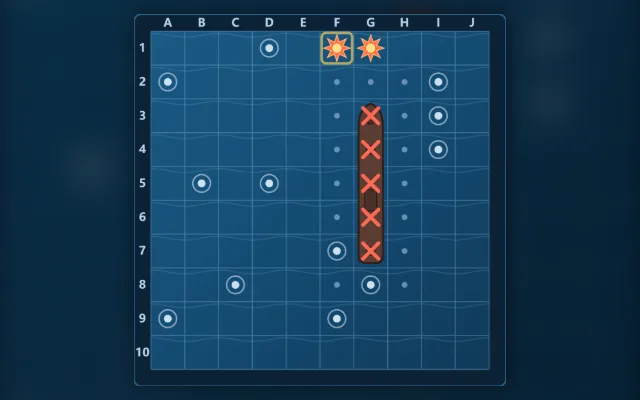
A ship sinks when all of its cells are hit. Its position is revealed, and the cells around it are marked empty, since no other ship can be there.
The first side to sink the whole enemy fleet wins.
Optional Fire again after a hit: after a hit or a sink the same side fires again, and the turn passes only after a miss.
Online, fleet placement has a 60-second limit; when time runs out, your current layout is used and you are set to ready. Each shot has a 30-second limit; on timeout a shot is fired for you and auto-play turns on. Leaving mid-game counts as a loss. Offline games have no time limit.
Playing guide
These options and rules describe the current JoyPip version. Choose a mode above before starting; rules are also available during play.
Step-by-step examples
Select a step to see what changes. These are partial examples, not full starting positions.
1 / 3
Practice options
Bot skill
Beginner · Amateur · Professional · Master
Fire again after a hit
Off (take turns) · On
Private room options
Fire again after a hit
Off (take turns) · On
Detailed rules and controls
Tips
Ships cannot touch: after a hit, the four diagonal cells next to it are certainly empty, so don't waste shots on them
Once two hits line up, the ship runs along that line: fire at both ends
When searching, fire at every other cell (like one colour of a checkerboard) and no ship can slip through
Once the small ships are sunk, the rest are longer, so you can leave bigger gaps between shots
Don't crowd your ships along the edges: when one sinks, all the cells around it are marked empty
Controls
Placement: drag a ship to a new spot, or tap a ship to select it and then tap the sea to move it there; tap the selected ship again to rotate it
Random setup places all ships again
Firing: tap a cell of the enemy sea that has not been shot yet; a yellow frame marks where each side's last shot landed
Keyboard: arrow keys move the cursor, Enter selects or fires, R rotates the selected ship
Frequently asked questions
After a hit, where should the next shot go?
You hit E5, then E6 is a hit too: this ship lies vertically, so your next shot goes to E4 or E7. Don't bother with diagonal cells such as D4 or F6: ships cannot touch, so they are certainly empty. Once the ship is sunk, the cells around it are marked empty as well.
Do I need a download or a linked email?
Play directly in your browser without a download. Linking email is an optional way to recover your account. Before clearing browser data, consider whether you need to keep your account or local records.
Do matches earn or spend coins?
Earn coins by checking in and spend them on cosmetics. Matches never cost or award coins.