
Playing guide
These options and rules describe the current JoyPip version. Choose a mode above before starting; rules are also available during play.
Step-by-step examples
Select a step to see what changes. These are partial examples, not full starting positions.
Detailed rules and controls
Controls
- Press an endpoint and drag to draw. Dragging back over cells you've drawn retraces the line; once it reaches the other endpoint of its color, the line is complete and can only be retraced.
- Dragging into another color's line cuts it at that cell; drag back out before letting go and it is restored. Other colors' endpoints block the way.
- Each color has its own small symbol on its endpoints; if colors are hard to tell apart, match the symbols.
- Keyboard: arrow keys move the cursor; Enter or Space starts a line at the cursor, then draw with the arrow keys, Enter to finish and Esc to cancel; Delete clears the line under the cursor.
Moves and hints
- Drawing or clearing a line counts as 1 move, and consecutive actions on the same color count as one, so the minimum number of moves equals the number of colors. Undo takes moves back; restarting the level resets the count to 0.
- You get 3 hints per level: a hint first fixes a color that is connected the wrong way, otherwise it draws the longest color not yet connected correctly; lines in its way are cut. Hints don't count as moves.
- Clearing a level without hints and in as many moves as there are colors is a perfect clear.
- Your fewest moves for each level number are saved on this device and shown when you clear the level; a level where you used a hint doesn't count as a record.
- Giving up ends the run; afterwards you can start again from the level where you gave up.
Frequently asked questions
All colors are connected, so why isn't the level cleared?
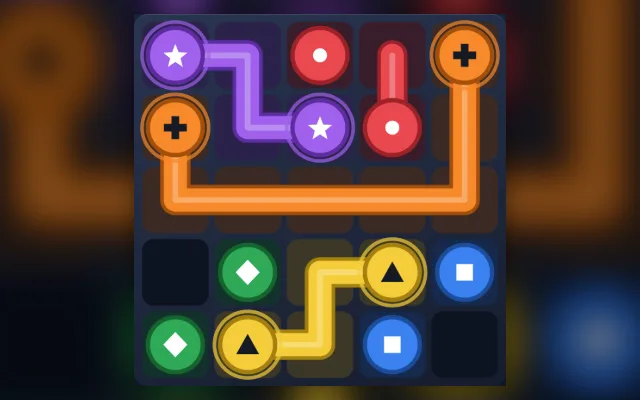
On a 5×5 board all five colors are connected, but Filled shows only 92%: two cells are still empty. Every cell has to be covered, so the line next to the empty cells must have taken a shortcut: reroute it with an extra bend through those two cells before it reaches its endpoint. Each level has only one solution, so once that line is right, the level is cleared.
Do I need a download or a linked email?
Play directly in your browser without a download. Linking email is an optional way to recover your account. Before clearing browser data, consider whether you need to keep your account or local records.
Do matches earn or spend coins?
Earn coins by checking in and spend them on cosmetics. Matches never cost or award coins.