
Playing guide
These options and rules describe the current JoyPip version. Choose a mode above before starting; rules are also available during play.
Step-by-step examples
Select a step to see what changes. These are partial examples, not full starting positions.
Practice options
- Mode
- Levels · Relaxed endless
Detailed rules and controls
Merging
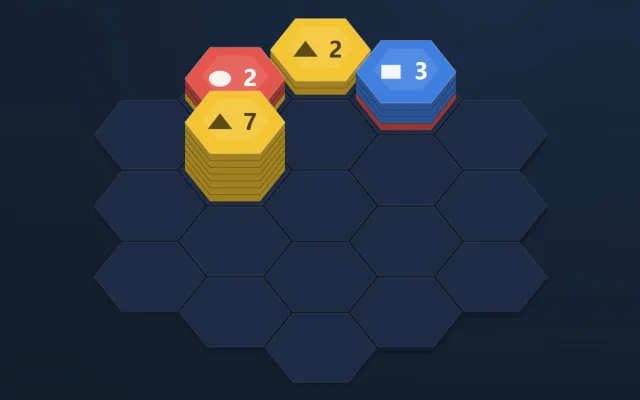
- Only the same-colour tiles at the top of each stack (the top layer) count; the colours below stay put for now.
- The collecting stack is the one in the group with the largest top layer; on a tie, the stack just placed (or being resolved) wins, then the order up, upper right, lower right, down, lower left, upper left.
- A top layer of 10 or more tiles clears in one go, extra tiles included. Colours uncovered after giving away a layer or after a clear merge in the same way.
- When merging stops, no two neighbouring stacks have the same top colour.
Score
- Each cleared tile scores 10 points. When one placement clears several layers in a row, the 2nd earns an extra 50, the 3rd an extra 100, and so on.
- Levels: clearing a level adds level × 100 points; your score and the level you reached are saved on this device when the run ends.
- Relaxed endless: every 100 cleared tiles give back one hammer and one Redeal (at most 1 of each in stock); your best score is kept on this device.
Controls
- Drag: on touch screens the stack floats above your finger and the highlighted empty cell shows where it will land; let go to place it. Dropping it elsewhere sends it back.
- Tap: tap a stack below, then an empty cell to place it; tap the stack again to cancel. While dragging or selecting, the neighbouring stacks it will merge with light up.
- Hammer: tap Hammer, then a stack on the board to knock it off (those tiles don't score); tap Hammer again to cancel.
- Hint (H): tries every placement and looks two moves ahead, then lights up the best stack and empty cell and selects that stack; tap the glowing cell to place it. On a full board it shows which stack to hammer, and when any placement would fill the board it suggests a redeal first.
- Hint uses: 3 per level in Levels (restored when you retry the level); Relaxed endless starts with 3 and refills them every 100 cleared tiles. Asking again for the hint you just got costs nothing.
- Keyboard: 1, 2, 3 pick a stack, arrow keys move the cursor, Enter or Space places it, H shows a hint, Esc cancels.
- Every colour also has its own symbol (circle, square, triangle, diamond, star, cross, ring, heart); the number on the top face is the size of the top layer.
Frequently asked questions
Which stack do matching tiles move onto?
When a neighbouring stack has 7 reds on top, place a stack with 3 reds on top beside it: the reds move onto the 7, reach 10 and clear at once; if blue is uncovered and a neighbour also shows blue, it merges next. When empty cells run low, place stacks that merge first, and save the hammer for the messiest stack once the board is full.
Do I need a download or a linked email?
Play directly in your browser without a download. Linking email is an optional way to recover your account. Before clearing browser data, consider whether you need to keep your account or local records.
Do matches earn or spend coins?
Earn coins by checking in and spend them on cosmetics. Matches never cost or award coins.