Playing guide
These options and rules describe the current JoyPip version. Choose a mode above before starting; rules are also available during play.
Step-by-step examples
Select a step to see what changes. These are partial examples, not full starting positions.
Practice options
- Players
- 2 players · 3 players · 4 players
- Pieces per player
- 2 (quick) · 4 (standard)
- 빽도 (back-do: 1 step back)
- Enabled · None
- Bot skill
- Beginner · Normal · Smart · Expert
Private room options
- Players
- 2 players · 3 players · 4 players
- Pieces per player
- 2 (quick) · 4 (standard)
- 빽도 (back-do: 1 step back)
- Enabled · None
Detailed rules and controls
Throws
- 도 (do): 1 stick flat side up, move 1 (about 11.5%)
- 개 (gae): 2 sticks flat side up, move 2 (about 34.6%)
- 걸 (geol): 3 sticks flat side up, move 3 (about 34.6%)
- 윷 (yut): all 4 flat side up, move 4 and throw again (about 13.0%)
- 모 (mo): all 4 round side up, move 5 and throw again (about 2.6%)
- 빽도 (back-do): only the marked stick flat side up, move 1 back (about 3.8%; counts as 도 when back-do is off)
- Each stick lands flat side up 60% of the time
Shortcuts
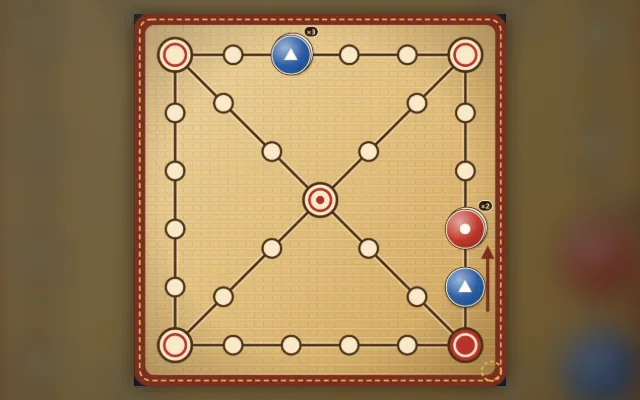
- Stop on the top-right corner: go down the diagonal straight through the centre to the bottom-left corner, then along the bottom edge to the start — 4 steps shorter than the edge
- Stop on the top-left corner: go down the diagonal through the centre straight to the start — 4 steps shorter than the edge
- Stop on the centre: turn towards the start, which is 3 more steps away
- Passing a corner or the centre without stopping doesn't turn; the bottom-left corner has no shortcut
- 빽도 moves one step back the way the piece came; a piece on the first station that backs onto the start is home with any forward move
Controls
- Tap “Throw” to throw the sticks; after 윷, 모 or a capture the button lights up again
- Tap a result in the tray and then a piece, or tap a piece and then a highlighted destination; when only one move is possible it is played for you
- Keyboard: Space or T throws, number keys 1–5 pick a result (0 for 빽도), Tab moves between pieces and destinations, Enter confirms, Esc clears the selection
Frequently asked questions
Can I take a shortcut while passing a corner?
Landing exactly on the upper-right corner opens a shortcut for the next move; merely passing it does not. With several saved throws, change their order to try to stop at a shortcut entrance.
Do I need a download or a linked email?
Play directly in your browser without a download. Linking email is an optional way to recover your account. Before clearing browser data, consider whether you need to keep your account or local records.
Do matches earn or spend coins?
Earn coins by checking in and spend them on cosmetics. Matches never cost or award coins.