
Playing guide
These options and rules describe the current JoyPip version. Choose a mode above before starting; rules are also available during play.
Step-by-step examples
Select a step to see what changes. These are partial examples, not full starting positions.
Detailed rules and controls
Controls
- Touch or mouse: hold and drag sideways in the game area. The squad follows the drag distance without jumping to the initial touch point.
- Keyboard: ← → or A/D to move; Space or Enter to start or continue; Esc or P to pause.
- Rotating the screen, switching apps or losing focus pauses the game. Tap Continue for a brief ready period before play resumes.
Saving
- Progress is saved at each mission start and clear. If you leave midway, continue from the start of that mission.
- Each level starts with a fresh squad: troops and weapon reset, while your score carries over between consecutive clears. The legion holds up to 120 troops, and any unlocked level can be replayed.
- From level 11 on, levels are generated from their number: the same level is always the same, and every one has been checked by the computer to be beatable.
Frequently asked questions
Rescue hostages or stop the horde first? How do number gates and boost gates work?
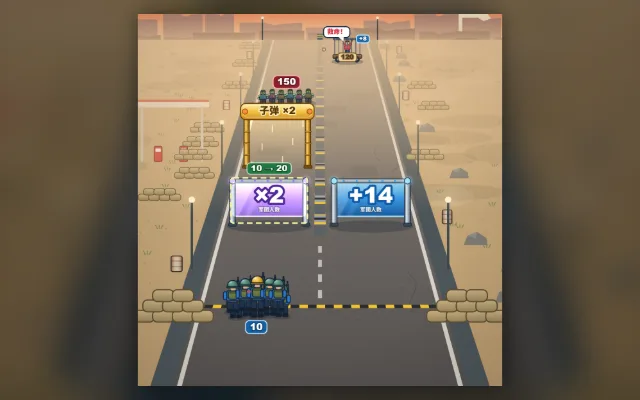
With 10 troops, a +14 gate makes 24 and a ×2 gate makes 20; a few more shots turn a red −6 gate into +2. Bullets double when they pass through a gold boost gate, so hit hordes while they're behind it. Opening a hostage cage cart adds a few more troops, but don't let a horde reach your line.
Do I need a download or a linked email?
Play directly in your browser without a download. Linking email is an optional way to recover your account. Before clearing browser data, consider whether you need to keep your account or local records.
Do matches earn or spend coins?
Earn coins by checking in and spend them on cosmetics. Matches never cost or award coins.